> For the complete documentation index, see [llms.txt](https://docs.plura.io/ko/llms.txt). Markdown versions of documentation pages are available by appending `.md` to page URLs; this page is available as [Markdown](https://docs.plura.io/ko/agents/siem/uplc/apache-httpd-error.md).
# Apache httpd error
{% hint style="info" %}
Apache httpd error 로그 수집 방법 안내
{% endhint %}
### 1. conf 설정(rsyslog 사용)
* 80-httpd.conf > conf 파일 생성하기
```bash
cd /etc/rsyslog.d/
vi /etc/rsyslog.d/80-httpd.conf
```
### 2. conf 파일 생성
```
File = "로그 경로", Tag = "태그", Severity = "심각도", programname ="“프로그램명"
```
vi /etc/rsyslog.d/80-httpd.conf
```
#variables required for non-syslog log file forwarding – httpd error log file
#edit on your location
input(type=”imfile”
File=”/var/log/httpd/error_log”
Tag=”httpd”
Severity=”error”
Facility=”local7″)
###### Creates a template for each log file in the Logentries UI
### logic to apply the relevant templates to the different log files
if $programname == ‘httpd‘ then /var/log/plura/ceelog-127.0.0.1.log;CEETemplate
:programname, isequal, ‘httpd‘ stop
```
**2-1. repo 에서 다운로드 받기**
```bash
wget https://repo.plura.io/v5/module/rsyslog/80-httpd.conf
```
```bash
curl https://repo.plura.io/v5/module/rsyslog/80-httpd.conf -o /etc/rsyslog.d/80-httpd.conf
```
### 3. rsyslog 데몬 재시작
```bash
service rsyslog restart
```
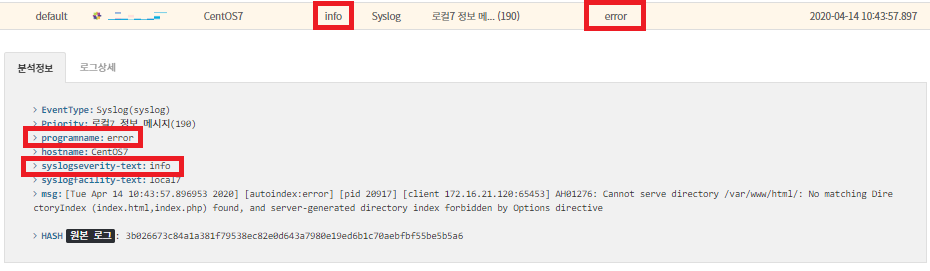
### 4. 탐지 확인
* 로그 예시 : [전체로그 > 호스트](https://docs.plura.io/ko/function/common/flog/host)
* [x] 위 내용을 활용해서 필터를 등록하면 탐지로그를 확인할 수 있습니다.
> [https://docs.plura.io/ko/fn/comm/filter/syslog](https://docs.plura.io/ko/function/common/filter/syslog)
### 참고 사이트
>