> For the complete documentation index, see [llms.txt](https://docs.plura.io/ko/llms.txt). Markdown versions of documentation pages are available by appending `.md` to page URLs; this page is available as [Markdown](https://docs.plura.io/ko/agents/siem/uplc/postgresql.md).
# PostgreSQL
## CentOS
### 1. postgresql.conf 수정
```
> 사전 Syslog 설치 필요
> Config 위치 확인
[config 경로 예시] /var/lib/pgsql/9.6/data/postgresql.conf
[수정 예시] # ERROR REPORTING AND LOGGING 하단에서 수정
log_destination = ‘stderr’ 라인을 주석처리
log_destination = ‘syslog’ 라인 추가
# These are relevant when logging to syslog: 하단의 다음 4라인 주석 해제
#syslog_facility = ‘LOCAL0’
#syslog_ident = ‘postgres’
#syslog_sequence_numbers = on
#syslog_split_messages = on
```
### 2. PostgreSQL 및 Syslog 재시작
* 버전에 따라 서비스명이 다르므로 버전 확인
psql –version
```
[버전 출력 예시] psql (PostgreSQL) 9.6.15
[서비스명 확인 경로 예시] /etc/systemd/system/multi-user.target.wants/postgresql-9.6.service
[위의 예시로 확인된 버전에 따른 재시작 예시] service postgresql-9.6 restart
```
service rsyslog restart
### 3. 로그 확인
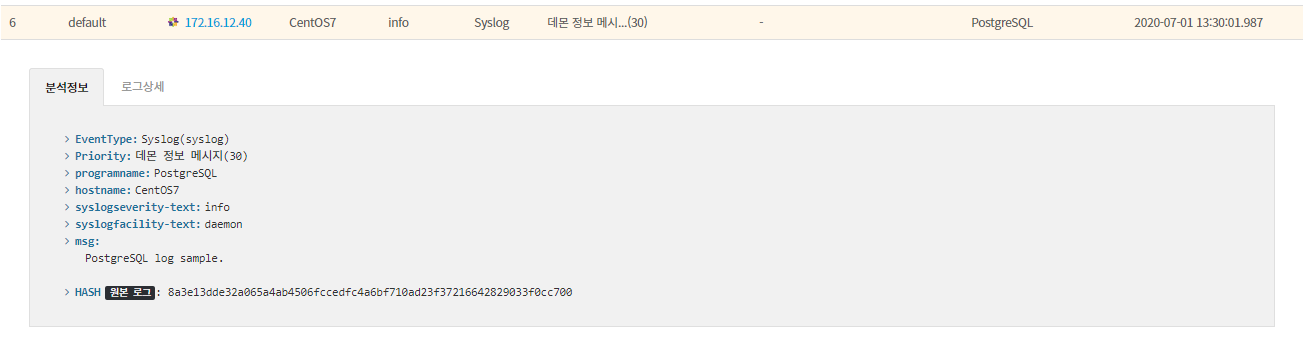
* 로그 예시 : [전체로그 > 호스트](https://docs.plura.io/ko/function/common/flog/host)
* [x] 위 내용을 활용해서 필터를 등록하면 탐지로그를 확인할 수 있습니다.
> [https://docs.plura.io/ko/fn/comm/filter/syslog](https://docs.plura.io/ko/function/common/filter/syslog)
***
## Ubuntu
### 1. postgresql.conf 수정
```
> 사전 Syslog 설치 필요
> Config 위치 확인
[config 경로 예시] /var/lib/pgsql/9.6/data/postgresql.conf
[수정 예시] # ERROR REPORTING AND LOGGING 하단에서 수정
log_destination = ‘stderr’ 라인을 주석처리
log_destination = ‘syslog’ 라인 추가
# These are relevant when logging to syslog: 하단의 다음 4라인 주석 해제
#syslog_facility = ‘LOCAL0’
#syslog_ident = ‘postgres’
#syslog_sequence_numbers = on
#syslog_split_messages = on
```
### 2. PostgreSQL 및 Syslog 재시작
```bash
systemctl restart postgresql
service rsyslog restart
```
### 3. 로그 확인
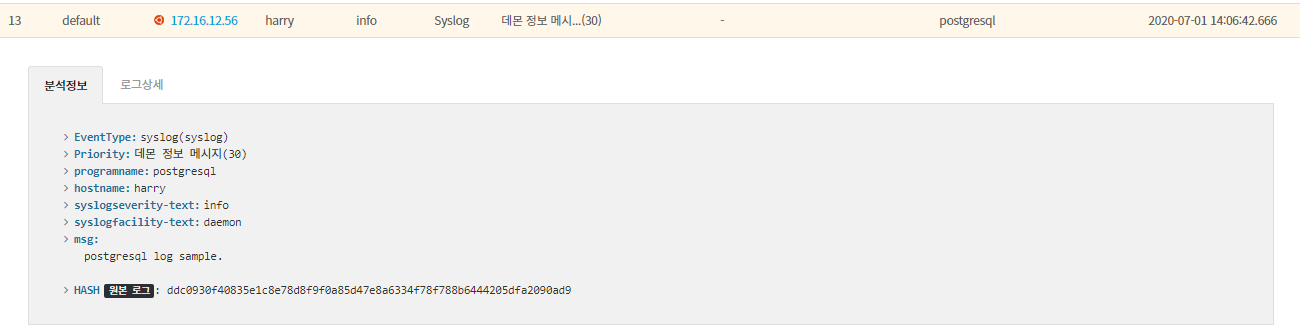
* 로그 예시 : 전체로그 > 호스트
* [x] 위 내용을 활용해서 필터를 등록하면 탐지로그를 확인할 수 있습니다.
> [https://docs.plura.io/ko/fn/comm/filter/syslog](https://docs.plura.io/ko/function/common/filter/syslog)