> For the complete documentation index, see [llms.txt](https://docs.plura.io/ko/llms.txt). Markdown versions of documentation pages are available by appending `.md` to page URLs; this page is available as [Markdown](https://docs.plura.io/ko/agents/siem/uplc/application-log-plc.md).
# Application log(PLC)
> 응용프로그램 로그에서 특별한 키워드를 실시간 탐지하고 싶은 경우 어떻게 하면 될까요?
>
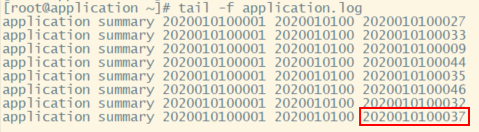
> 예를 들어, 아래와 같은 응용프로그램 로그 中 **2020010100037** 키워드를 실시간 탐지할 경우입니다.
### 1. 수집되는 로그 확인하기
### 2. conf 설정하기(rsyslog 사용)
* 80-application.conf → conf 파일 생성하기
```bash
vi /etc/rsyslog.d/80-application.conf
```
### 3. conf 파일 생성 예시
* File = "로그 경로", Tag ="“로그 태그", Severity ="“심각도"
* 파일명에 와일드카드를 사용해야 하는 경우는 **rsyslog 버전 8.25 이상** 을 사용하셔야 합니다.
# variables required for non-syslog log file forwarding – application log file #edit on your location
input(type=”imfile” File=”/var/log/application.log” Tag=”application” Severity=”info” Facility=”local7″)

### Creates a template for each log file in the Logentries UI
### logic to apply the relevant templates to the different log files
if $programname == “application” then /var/log/plura/ceelog-127.0.0.1.log;CEETemplate
:programname, isequal, “application” ~
3-1. repo 에서 다운로드 받기
```bash
wget https://repo.plura.io/v5/module/rsyslog/80-application.conf
curl https://repo.plura.io/v5/module/rsyslog/80-application.conf -o /etc/rsyslog.d/80-application.conf
```
### 4. rsyslog 데몬 재시작
```bash
service rsyslog restart
```
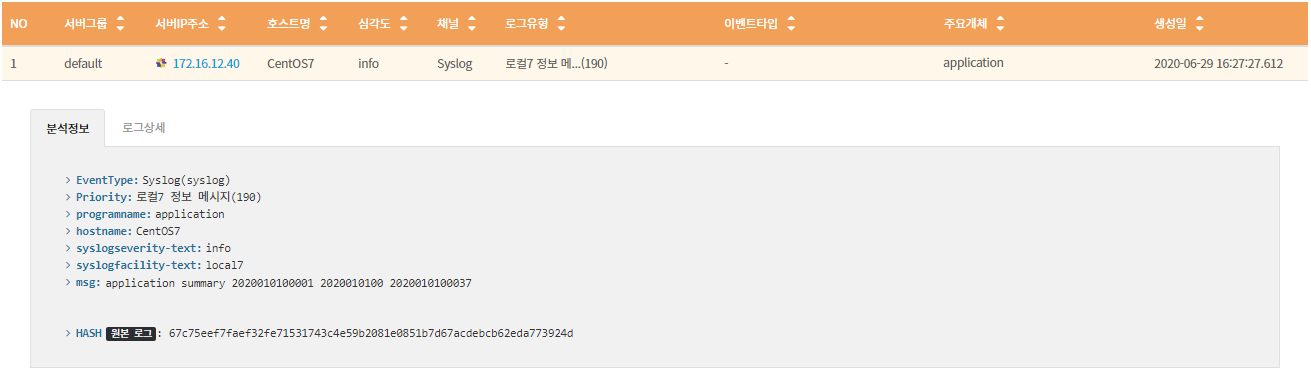
### 5. 로그 확인
* [전체로그 > 호스트](https://docs.plura.io/ko/function/common/flog/host) > 주요개체 컬럼에서 application 확인
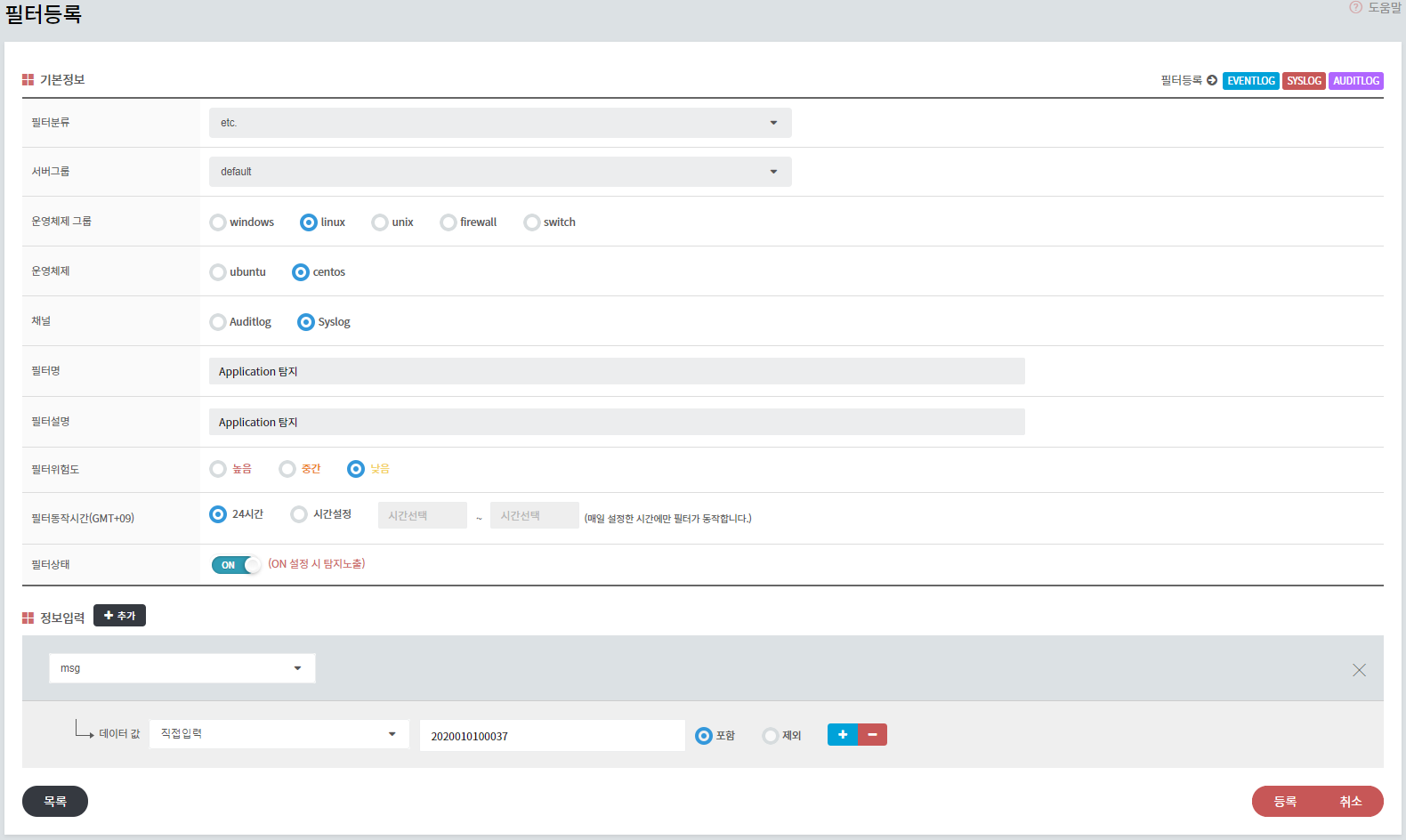
### 6. 실시간 탐지 필터 등록하기
* 2020010100037 키워드에 대한 실시간 탐지 등록 필터
* [필터 > 등록필터](https://docs.plura.io/ko/function/common/newfilter) > 호스트/웹/웹방화벽 > 등록
* 필터등록 하단 > 정보입력 > msg > 2020010100037 등록
### 7. **최신 rsyslog 설치하기**
```bash
cp /etc/yum.repos.d/rsyslog.repo /etc/yum.repos.d/rsyslog.repo.old
curl -s http://rpms.adiscon.com/v8-stable/rsyslog.repo -o /etc/yum.repos.d/rsyslog.repo
yum -y install rsyslog
yum list rsyslog
rsyslogd -version
rsyslogd 8.2012.0 (aka 2020.12) compiled …
```
### 참고 사이트
>