> For the complete documentation index, see [llms.txt](https://docs.plura.io/ko/llms.txt). Markdown versions of documentation pages are available by appending `.md` to page URLs; this page is available as [Markdown](https://docs.plura.io/ko/fn/comm/sfilter/forgery.md).
# 홈페이지 위변조
Website Forgery
{% hint style="info" %}
홈페이지 위변조 발생 시, **실시간으로 로그를 분석**하여 공격을 탐지합니다.\
감사 정책 설정이 필수입니다.
**홈페이지 위변조 탐지 확인**
* **경로**: 보안탐지 > 홈페이지 위변조
* **필터**: 보안 > [홈페이지 위변조 ](https://docs.plura.io/ko/function/common/sfilter/forgery)
{% endhint %}
### 운영체제별 필터 등록
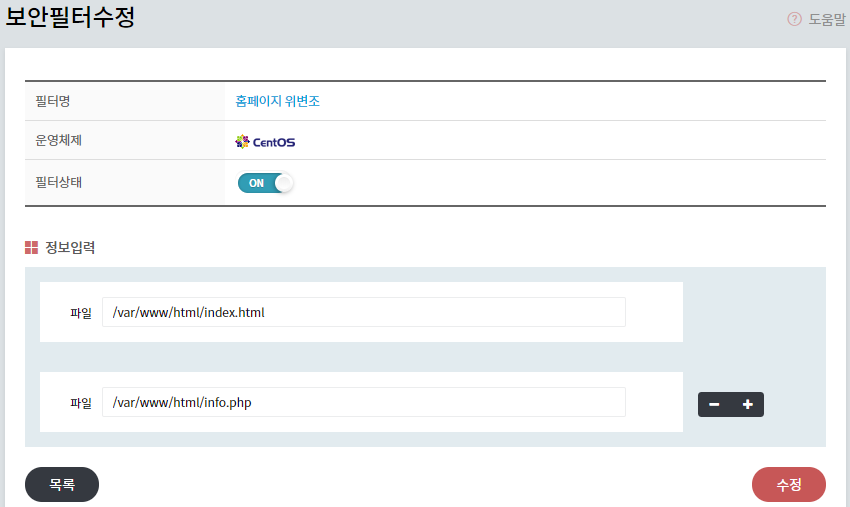
* **Windows**와 **CentOS** 각각에 맞춰 필터 등록
* **위변조 확인 파일**: 호스트 IP 주소를 제외한 경로 입력
* 예시
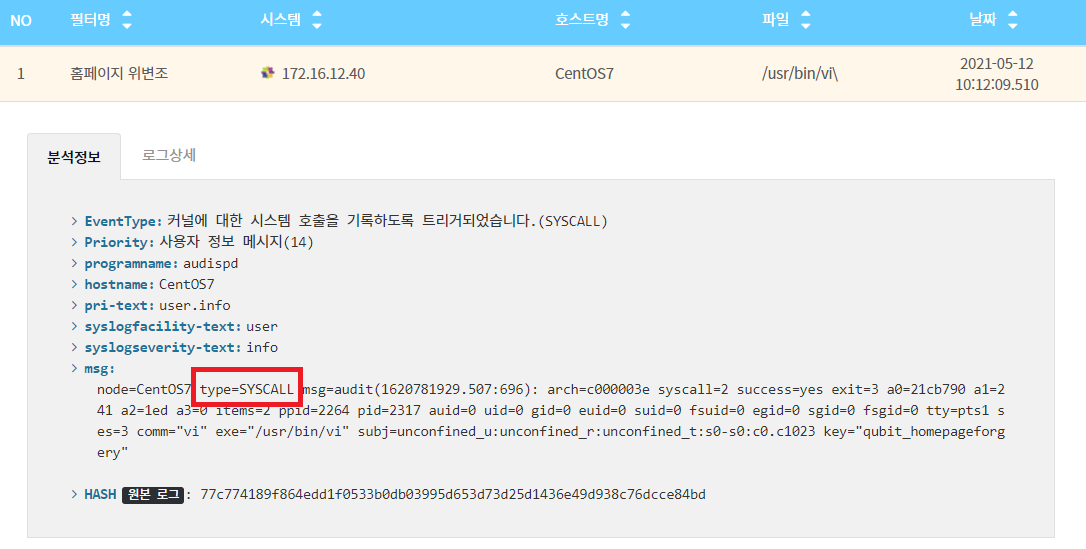
* "type=SYSCALL"로 표시되는 경우, 변조된 파일 경로를 확인할 수 없습니다.
* CentOS/Ubuntu 버전과 상관없이, 각 운영체제의 시스템 환경에 따라 차이가 있을 수 있습니다.