> For the complete documentation index, see [llms.txt](https://docs.plura.io/ko/llms.txt). Markdown versions of documentation pages are available by appending `.md` to page URLs; this page is available as [Markdown](https://docs.plura.io/ko/v6/fn/comm/systemmgmt/system/forensic.md).
# 포렌식
Forensic
{% hint style="info" %}
에이전트 설치 후 시스템의 설정 정보를 자동으로 수집하여 보관합니다.\
이후 이상 징후가 발생하면 새로운 설정 정보를 수집하여 기존 데이터와 비교함으로써 침해 여부를 확인할 수 있습니다.
**포렌식 메뉴 설정**
포렌식 기능을 사용하려면 **메뉴 노출 설정**이 필요합니다.\
기본값은 **OFF**로 설정되어 있으며, 아래 경로에서 설정을 활성화할 수 있습니다.
* **설정 경로**:\
`관리` > `사용` > `호스트 보안` > `포렌식`
**권한 설정**
* **메뉴 노출 설정 권한**: 관리자만 가능
* **수집/초기화 권한**: 관리자 및 운영자
{% endhint %}
### 1. 수집 대상
#### 1-1. 시스템 설정 관리
* 시스템 및 네트워크 설정
#### 1-2. 아티팩트 위변조 관리
* 시스템 무결성 검사
* 시스템 최적화 및 사용 패턴
#### 1-3. 아티팩트 동적 관리
* 네트워크 활동
#### 1-4. 사용자 지정 관리
* 파일 및 데이터 관리
* 시스템 및 네트워크 설정
* 사용자 활동 및 트래킹
#### 1-5. 메모리 및 저장소 검사
* 메모리 및 저장소 검사
* 시스템 및 네트워크 설정
#### 1-6. 자동 실행 관리
* 시스템 및 네트워크 설정
* 시스템 무결성 검사
#### 1-7. 소프트웨어 및 패치 관리
* 소프트웨어 및 패치 현황
* Sysmon 관리
#### 1-8. 사고 대응 관리
* 프로세스 관리
* 시스템 무결성 검사
### 2. 데이터 수집 (자동)
에이전트 설치 후, 시스템 상태를 자동으로 수집합니다.
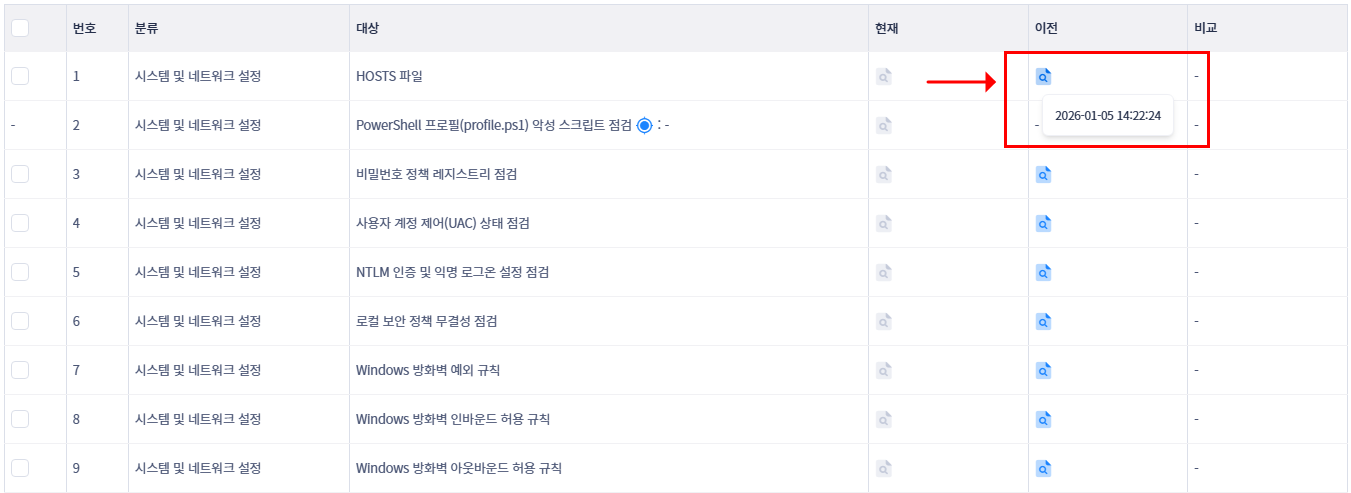
* **최초 수집 시점**: 에이전트 설치 완료 직후 시스템 기준값(Baseline) 자동 생성
* 마우스를 해당 항목에 오버하면 **수집된 날짜 및 시간**이 툴팁으로 표시됩니다.
* 수집된 데이터는 **AI분석**, **복사 및 다운로드**할 수 있습니다.
### 3. 데이터 수집 (수동)
파일 경로를 직접 입력하거나 수집 대상을 선택하여 데이터를 수집할 수 있습니다.
* 특정 파일 수집 아이콘 클릭
### 4. 현재 값 수집
* 대상 항목 체크 후 `수집` 버튼을 클릭하여 현재 시스템 상태 데이터를 즉시 수집합니다.
* 복수 항목 선택은 플래티넘 라이선스 이상에서만 지원합니다.
* 최근 1시간 이내 수집된 항목은 주황색 아이콘으로 강조 표시되며, 텍스트 복사 및 파일 다운로드가 가능합니다.
### 5. 경과 기록 목록
* 포렌식 자동 연동에 따른 덮어쓰기 방지를 위해 포렌식 경과 기록 목록을 노출합니다. (20개 노출)
* 자동 포렌식이 실행될 때마다 각 결과를 개별 이력으로 보존하고, 사용자가 특정 시점의 결과를 선택하여 이전 결과와 비교할 수 있도록 합니다.
* 파란색 체크 아이콘: 이전 수집 값과 비교 결과 변동 사항 없음 (동일)
* 빨간색 느낌표 아이콘: 이전 수집 값 대비 변경/위변조 발생 (차이 발생)
### 6. 초기화
* 초기화할 항목을 선택한 후 `[초기화]` 버튼을 클릭하면, 기존 데이터가 삭제되고 현재 수집된 최신 데이터가 새로운 기준값(Baseline)으로 반영됩니다.
* 주의: 수집된 현재 정보가 없는 미수집 항목은 초기화할 수 없습니다.
### 7. 비교 (diff)
* 이전 수집값과 현재 수집값을 비교해 시스템에 변경이나 위변조가 감지되면 `diff` 버튼이 활성화됩니다.
* `diff` 버튼을 클릭하면 변경된 데이터를 확인할 수 있습니다.
### 📖 PLURA-Blog
* [PLURA 포렌식으로 빠르게 대응하세요: 몇 분 안에 확인해야 할 것들](https://blog.plura.io/ko/column/plura_forensic_quick_analysis/)
* [PLURA를 활용한 BPFDoor 탐지: Audit 로그와 포렌식 기반 대응](https://blog.plura.io/ko/respond/bpfdoor_with_plura/)