> For the complete documentation index, see [llms.txt](https://docs.plura.io/ja/llms.txt). Markdown versions of documentation pages are available by appending `.md` to page URLs; this page is available as [Markdown](https://docs.plura.io/ja/faq/siem/etc/antivirussw.md).

# ワクチンソフトウェア終了検出方法

### 1. Windows Defender終了検出 <a href="#id-1" id="id-1"></a>

**フィルタ名“Windows Defender終了”でデフォルト提供。**

### 2. 他のワクチンソフトウェア終了検出 <a href="#id-2" id="id-2"></a>

**ウェブからフィルタ登録することで設定方法**

2-1. フィルタ > 登録 > システム選択

2-2. サーバーグループ選択 > オペレーティングシステムWindows選択 > Securityチャンネル選択 > 詳細追跡分類選択 > イベントタイプ選択

<figure><img src="/files/n9uRR9lPHKLLc3xHDyri" alt=""><figcaption></figcaption></figure>

イベントタイプでプロセス終了(4689)選択

<figure><img src="/files/o6eDtQGPPLvnkzBIyBDC" alt=""><figcaption></figcaption></figure>

絵のように選択後、‘データ値’に使用するワクチンの必修プロセス名を入れて下段の‘登録’ボタンをクリック
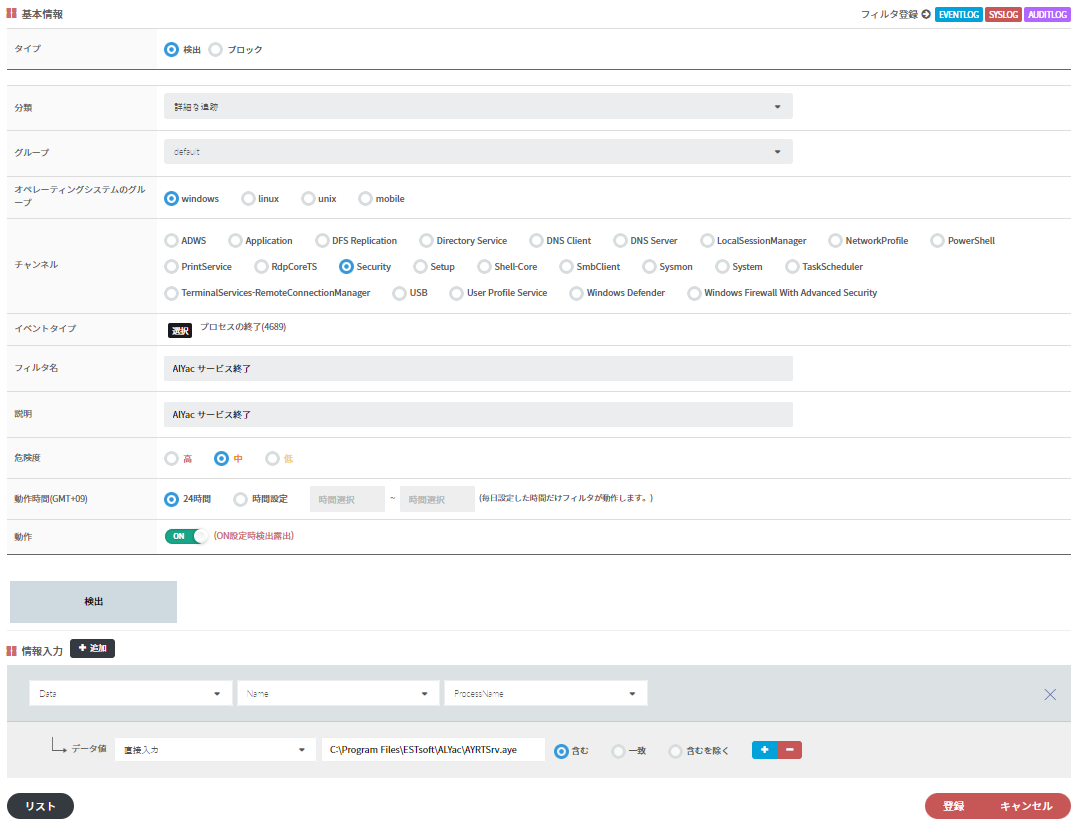
<figure><img src="/files/P77FAxtgviKdG6S1GFHK" alt=""><figcaption></figcaption></figure>

C:\Program Files\ESTsoft\ALYac\AYRTSrv.aye
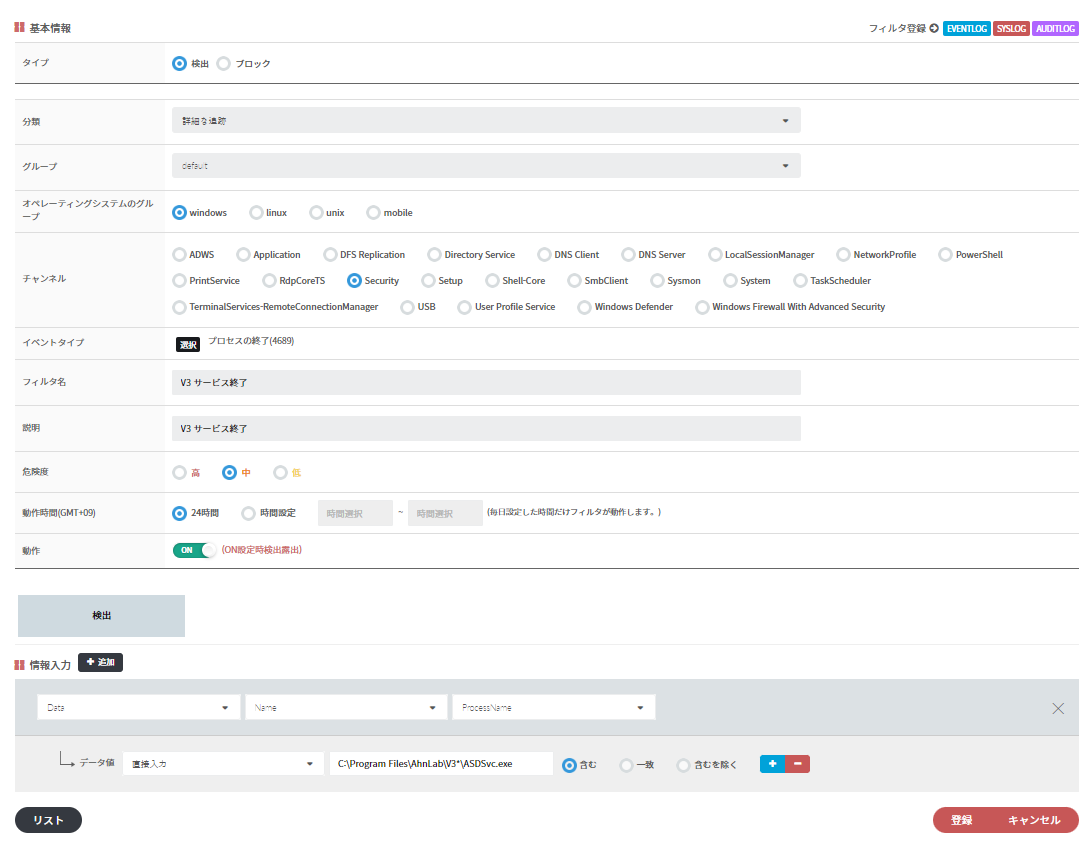
<figure><img src="/files/2rPxaQ2WbN0ltimG4CkJ" alt=""><figcaption></figcaption></figure>

C:\Program Files\AhnLab\V3\*\ASDSvc.exe

**例Kaspersky**
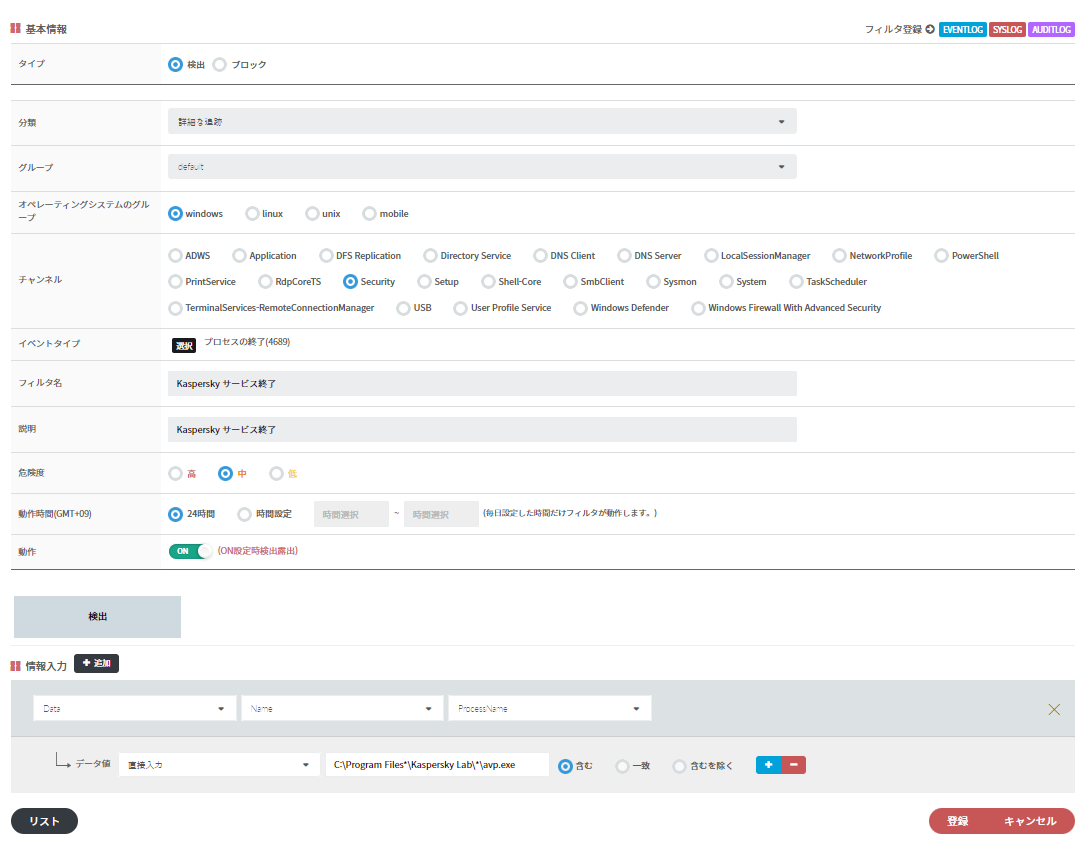
<figure><img src="/files/2YuJtGlzIuTiiBMoWfdm" alt=""><figcaption></figcaption></figure>

`# C:\Program Files*\Kaspersky Lab\*\avp.exe`<br>

**例Symantec Norton**

<figure><img src="/files/3rgEC7c39xPMIK16k6gL" alt=""><figcaption></figcaption></figure>

C:\Program Files\Norton Security\Engine\*\NortonSecurity.exe


---

# Agent Instructions
This documentation is published with GitBook. GitBook is the documentation platform designed so that both humans and AI agents can read, navigate, and reason over technical content effectively. Learn more at gitbook.com.

## Querying This Documentation
If you need additional information that is not directly available in this page, you can query the documentation dynamically by asking a question.

Perform an HTTP GET request on the current page URL with the `ask` query parameter, and the optional `goal` query parameter:

```
GET https://docs.plura.io/ja/faq/siem/etc/antivirussw.md?ask=<question>&goal=<endgoal>
```

`ask` is the immediate question: it should be specific, self-contained, and written in natural language.
`goal` is optional and describes the broader end goal you are ultimately trying to accomplish on behalf of the user. GitBook uses it to tailor the answer towards what is most useful for that goal.

The response will contain a direct answer to the question and relevant excerpts and sources from the documentation.

Use this mechanism when the answer is not explicitly present in the current page, you need clarification or additional context, or you want to retrieve related documentation sections.
